 AppltyMail
Stay focused with a cleaner inbox, smart splits and AI summaries on every thread.
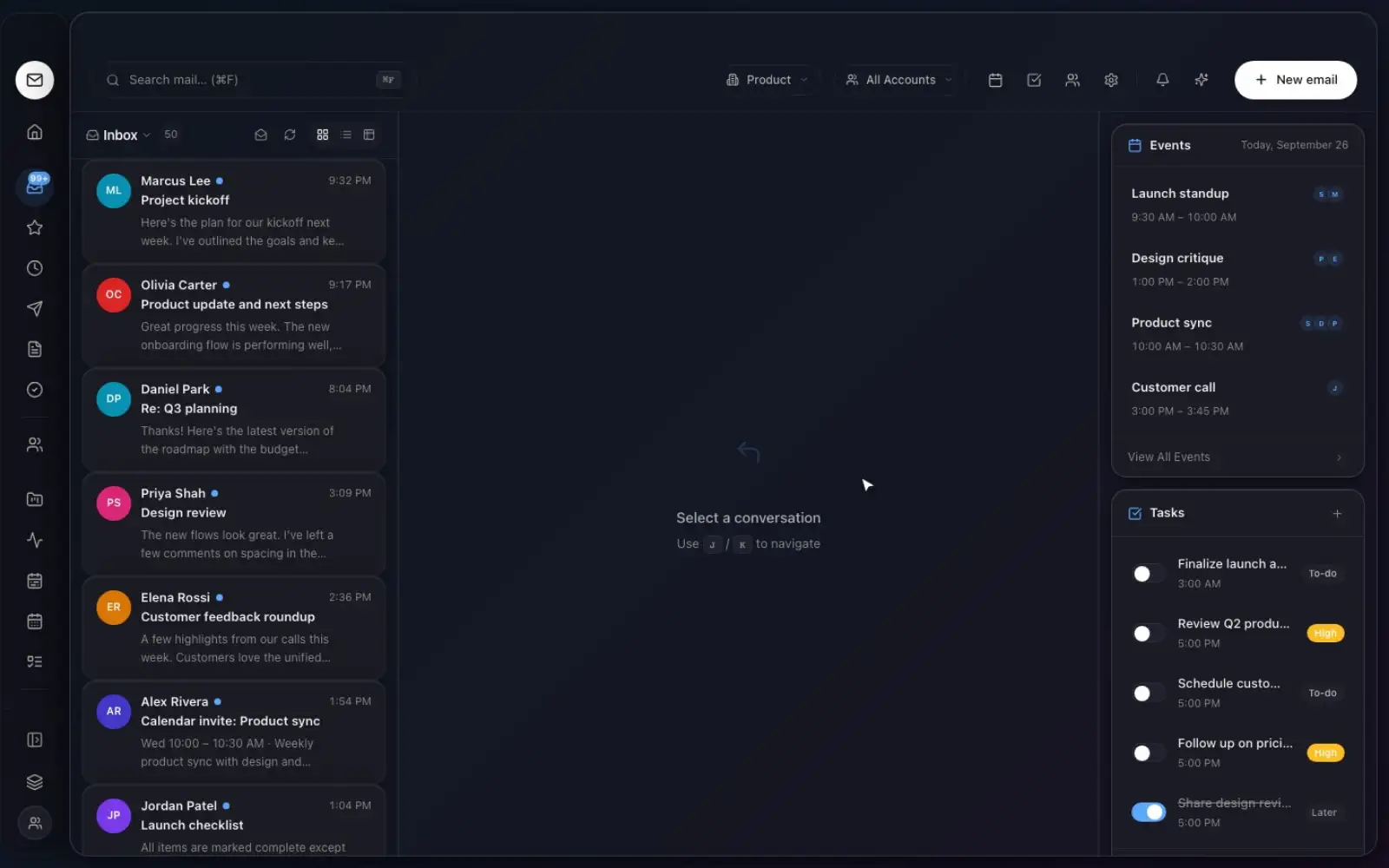
Step 01
Read less.
Your inbox, triaged.
Smart splits and a focused list put the conversations that matter at the top.
AppltyMail puts what matters first, summarizes long threads and turns emails into tasks, with your team chat and calendar right beside it.
Works with Gmail, Outlook and any IMAP account
A calmer, unified inbox for every account.
Chat
Channels and DMs next to the work.
Calendar
Meetings that link back to threads.
Tasks
Turn any message into a next step.
AI
Summaries, drafts and answers.
The workspace
Everything your team needs to move work forward, with AI that understands the bigger picture.
Stay focused with a cleaner inbox, smart splits and AI summaries on every thread.
Channels and direct messages that sit right next to the work they're about.
Turn conversations into plans, and plans into progress, without switching apps.
From conversation to progress
Emails, chat and meetings in one place.
Sarah Kim 9:14 AM
Re: Launch planning
Riley Torres 9:03 AM
Here's the latest from our side…
Product sync
Meeting notes · 5 highlights
An instant summary of what matters.
AI summary
View sources
Turn insights into tasks and events.
Step 01
Smart splits and a focused list put the conversations that matter at the top.
Team workspace
Shared channels, member roles and meetings live next to your mail, so conversations move from an email to a decision without anyone copy-pasting.
Invite teammates by email, set owner, admin or member roles, and keep every workspace isolated.
Public channels, private groups and direct messages, one click from the email they're about.
Start a call from any channel. No extra app, no new link to hunt for.
Projects, sprints and planner
Work that starts in an email or a chat becomes a task on a board, a sprint commitment and a slot in your week.
Docs and goals
Keep the plan and the numbers next to the work, instead of in another tool nobody opens.
Nested pages in Markdown for plans, specs and meeting notes, linked to the tasks they describe.
Set quarterly goals, link the tasks that move them, and see progress and risk at a glance.
Dashboards
Build dashboards from task counts, status and priority breakdowns, time tracked and sprint velocity. They update as your team works.
Automations and forms
Simple rules that connect mail, chat and tasks, plus intake forms that turn requests into work.
AppltyMail AI
Bring your own AI. AppltyMail does not lock you into our models or mark up your tokens. Add your OpenAI, Anthropic, Gemini, or Ollama key in Settings. Summaries, drafts, agents, and ask-your-inbox run on your account. No AI key required to use mail, chat, calendar, and tasks.
Security & privacy
Mail OAuth tokens and IMAP passwords are encrypted at rest. API keys never reach the browser.
Every workspace is isolated. Mail, chat and files are shared only inside your organization.
Choose OpenAI, Anthropic, Gemini or a local model like Ollama. Your keys, your provider.
Run the whole stack on your own server with Docker Compose and a dedicated PostgreSQL database.
Pricing
Every plan includes the AI workspace. Connect your own OpenAI, Anthropic, Gemini, or local model key in Settings — your keys, your usage, your cost. Upgrade for more seats and team tools.
Trying AppltyMail solo or with a tiny team
Up to 3 members
Freelancers and small teams who live in email
Up to 10 members · 14-day free trial
Everything in Free, plus:
Teams that want one workspace instead of Slack + a project tool
Up to 50 members · 14-day free trial
Everything in Pro, plus:
Contact us
Companies that need data on their own servers
Bring your own AI
AppltyMail does not lock you into our models or mark up your tokens. Add your OpenAI, Anthropic, Gemini, or Ollama key in Settings. Summaries, drafts, agents, and ask-your-inbox run on your account.
AI features unlock after you add your own API key in Settings. AppltyMail never bills you for AI tokens.
Web and desktop
The full product runs in your browser. Get the desktop app for native notifications and a dedicated window, connected to the same workspace.
macOS 12+ · Windows 10 64-bit+
Bring your inbox, team chat, calendar and tasks together in minutes. Free for small teams.